
Results
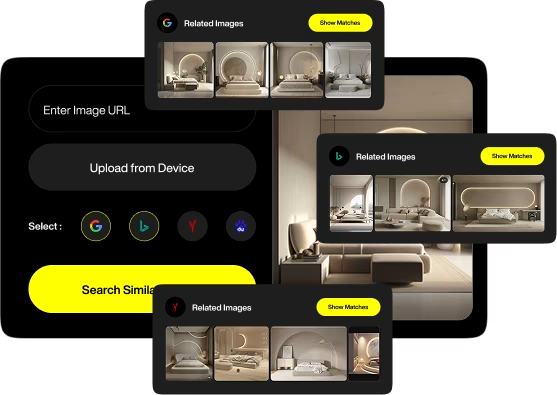
Find Similar Images in different search engines
Similar Images according to Google
Show MatchesSimilar Images according to Bing
Show MatchesSimilar Images according to Yandex
Show MatchesSimilar Images according to Baidu
Show Matches
How To Conduct A Reverse Image Search
Directly uploading them to the tool from your computer
Entering the image URL
Sourcing images from Google Drive or Dropbox
Entering a keyword related to the image you want to find
How To Conduct A Reverse Image Search Using A Smartphone Or A PC

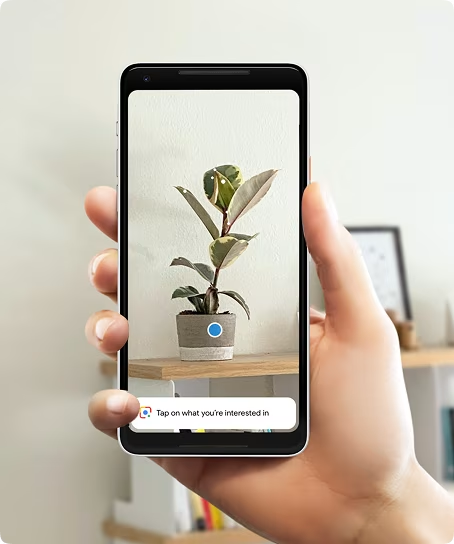
Conducting A Reverse Image Search On An Android Or iOS smartphone or tablet

Conducting A Reverse Image Search On A Windows Or MAC PC
Like most other tools, this is a PC-first tool. Because of this, if you are using a PC (regardless of its operating system), you have an extra option to conduct an image search.
Open this page on your preferred browser, and you will see the option to "drag and drop" an image into the tool. This is the quickest way to conduct a search using our reverse image search engine. Alternatively, you can use any of the options mentioned above to perform the search.
Reverse Image Search: When To Use It?
Example 1:
Example 2:

Tasks You Can Perform With A Reverse Image Search Engine
Get More Information About The Objects In The Image
Remember our example of using an image of a lamp to search? When you do that, the search engine will tell you more information about the lamp, like the manufacturer, the model number, and other information like where to find the lamp. If you use it to search for a picture of a cat, you will be presented with more information about that cat, like its breed and other bits of information related to that breed of cat.
Find Similar Images
Sometimes, you have an image that has the product or object you want in it, but it is not perfect for the purpose you have in mind. Our reverse image search tool will present you with other versions of the same image (if they are available on the web). This may include versions that are available in better quality, a different image format, or simply images of the same object clicked from a different angle.
Find The Original Source Of An Image
If you have found an excellent image on the web and want to use it on your website, the ethical thing to do is to contact the image owner and ask them for permission. Sometimes, simply giving credit to the creator may also work. However, you cannot do any of those things unless you know who the creator of the image is. This tool will tell you about the original source of the image you enter into the tool.
Find Instances Of Image Plagiarization
Just like you should give credit to others when you use their images, others must do the same when they use your image. However, the web is filled with instances where someone has used an image (or other creative property) that belongs to others without permission or even giving credit. If you publish images online, you can be a victim of a similar instance. By searching your image using the reverse image search tool, you can find all the places where your image has been used. Then, you can reach out to the website owners without permission or given credits and take the necessary action.
Find Backlink Opportunities
If someone has used their image on their website, it can be a lucrative opportunity to build a high-quality backlink. All you need to do is inform them they are using your image and request that they link back to your website. Once again, you can find other websites using your image without permission or credits using our reverse image search tool.
Get Rid Of Fake Accounts
Using someone else's identity to create and use a social media account is an unfortunate but common practice. If you think you have fallen prey to the same thing, you can find out by using this reverse image tool. Use the photos on your social media profile to search with the tool, and you will be presented with a list of all the websites, including social media platforms, that are using your images. Then, you can report the fake profiles on the respective social media platforms.
FAQs related to Reverse Image Search
Can reverse image search identify fake profiles and catfishing scams?
Yes. Reverse image search helps expose fake profiles by finding where a profile picture appears online. Spotting the same image online on a social media account or a stock image site is a red flag. It is a warning that someone is posing as another person. It is best always to be mindful.
Does reverse image search work with cropped or edited images?
Often, yes. Search engines use smart algorithms to spot similarities, even if a picture is cropped, resized, or filtered. Minor edits won’t fool the system. Small changes like resizing or slight cropping may not affect results much. However, heavy alterations like filters, overlays, or image flipping can reduce accuracy. Some tools use advanced recognition to detect modified versions, but success rates vary.
Can I perform a reverse image search on social media platforms?
Not directly. Most social platforms don’t have built-in reverse-image tools. However, you can download the image and use external search engines like Google Image Search or apps designed for this purpose. This can help you track reposts or spot image theft. If someone’s using your content without permission, you’ll know.
Is reverse image search safe and private?
Yes, if you use a reputable tool. Reverse image search doesn’t store or share uploaded images in most cases. But avoid platforms that ask for unnecessary data. Using a trusted tool to protect against security threats and vulnerabilities is advisable. You can use an incognito browser or a VPN for additional protection.
Can I use reverse image search to find high-resolution versions of an image?
Absolutely. A reverse search can locate higher-resolution versions or visually similar images when an image is compressed or of low quality.
What file formats are supported for reverse image search?
Most reverse image search tools accept JPG, PNG, and GIF formats. Some platforms even accept WebP and TIFF files. A quick conversion using free online tools can fix the issue if your image format isn’t supported. Reverse image search isn’t just about tracking photos. It’s a powerful way to verify identities, spot misuse of images, and discover hidden sources.