
Introduction
Focusing on search engine optimization (SEO) of your website pages certainly increases their chances of appearing on the search engine results pages (SERPs). However, if search engines cannot locate the most important pages on your website, they will never make it to the search results. The good news is that XML sitemaps can help you fix that problem.
What Is an XML Sitemap?
An XML sitemap is a file that lists all URLs on a site. It tells search engines like Google which URLs on a site should be indexed. A sitemap can have up to 50,000 URLs and a file size of up to 50 MB. It may also provide additional information about each URL, including how often the page is modified, when the page was last updated, and the page’s relative importance.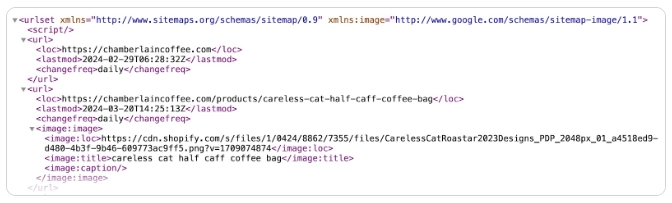 The sitemap file uses the Extensible Markup Language (XML) model, making the information more readable for search engine crawlers. Search engines use this information to crawl the site more efficiently. It also helps them match the pages with relevant search queries. Needless to say, XML sitemaps play a crucial role in SEO.
Why Do You Need an XML Sitemap?
A sitemap serves as a roadmap for your website. Search engines use your sitemap to locate the important pages of your website, whether or not you have a complete internal linking structure. If you want your website pages to appear in search engine results, you need an XML sitemap. If you do not have an XML sitemap, search engines will have to rely on hyperlinks (either on your site or elsewhere) to discover the pages of your website. An XML Sitemap also has a date and time stamp next to every URL it lists. This information tells search engines when the page was last updated. When the date in the sitemap changes, search engines will know that it is time to crawl the content again and index it. This way, an XML sitemap improves the visibility of your important web pages.Advantages of Using XML Sitemaps
As mentioned, XML sitemaps offer a structured map of your website. This offers numerous benefits for search engine optimization (SEO) and the overall performance of the website.More Crawlability
XML sitemaps enable search engines to crawl your sites efficiently by offering a clear and organized structure for your pages. If you have a large website with numerous pages or a site with complex navigation - sitemaps help you ensure that the search engines can discover and index all the important pages.Improved Indexing
Better crawlability makes it simpler for search engines to index your site’s pages. Since sitemaps highlight the content and its structure, search engines can easily understand the relationships between pages, enhancing the indexing process. By indexing the important pages, you increase the chances of appearing in search results.Better Visibility
A sitemap can boost your website’s visibility in search engine results by adding a comprehensive list of pages. Every website has a few pages that search engines cannot discover through regular crawling. Sitemaps help your site overcome that problem.Faster Indexing
XML sitemaps can accelerate the indexing process of new content by offering search engines information about recent changes and updates to the pages. This is extremely helpful for sites that frequently add new content. The information about the latest modification date offered by sitemaps tells search engines about fresh content, prompting them to index the pages quickly.Simpler Troubleshooting
XML sitemaps also help you identify issues or errors on your site. Regular reviews of your sitemap on tools like Google Search Console or others can help you spot problems like broken links, missing pages, or duplicate content. Fixing those problems improves your site's user experience and enhances its overall health. Sitemaps offer numerous benefits that improve your site’s crawlability, indexing, visibility, and overall search performance. Updating and maintaining your XML site helps optimize your website and makes it more accessible to search engines.How to Generate an XML Sitemap?
There are several ways you can create an XML sitemap for your website. Surprisingly, they are all quite straightforward.Creating Sitemaps Using WordPress
If you are using WordPress, you can generate an XML sitemap using a simple technique. All you need to do is add “wp-sitemap.xml” to the end of the URL. That’s it. WordPress will automatically generate your sitemap. Even though this method is simple, it may not produce the best sitemap. Experts suggest using a plugin to help. That can give you more control over which URLs (and information) are added to the sitemap and which aren’t.Use a Sitemap SEO Plugin
A majority of webmasters use the Yoast SEO plugin to create a sitemap. This plugin helps categorize your URLs to make the site structure clear. Once you have the Yoast plugin installed and activated, you need to make sure that the “XML sitemaps” toggle is turned on and click “Save Changes.”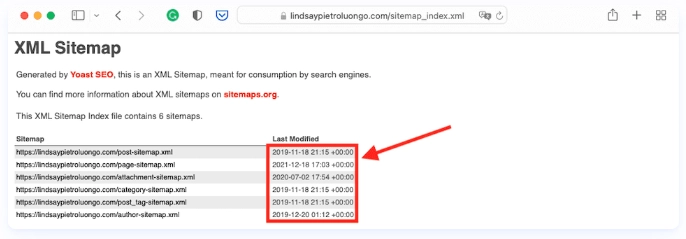 You can view your sitemap by clicking on the question mark next to the XML sitemaps toggle and following the given link. The sitemap URL generally follows a structure similar to this:
http://www.yourwebsite.com/sitemap_index.xml.
You can view your sitemap by clicking on the question mark next to the XML sitemaps toggle and following the given link. The sitemap URL generally follows a structure similar to this:
http://www.yourwebsite.com/sitemap_index.xml.
Other Ways to Create a XML Sitemap
If you do not work on WordPress, you need to generate your XML sitemap using a different method. You can find several tools online to do that. However, Google recommends letting your website software generate the sitemap for your website. Every website software has its own way of generating XML sitemaps for websites. You need to check with the software you are using to learn the specific method of creating a sitemap there. Drupal, Squarespace, and other content management systems have their own specific methods for sitemap generation.How Do You Submit Your Sitemap to Search Engines?
You do not always need to submit your XML sitemap to search engines. If your site has a thorough internal linking structure, search engines can find the URLs and index them. You will be surprised to know that search engines do not rely on sitemap submissions for indexing. They crawl and re-crawl websites to find content.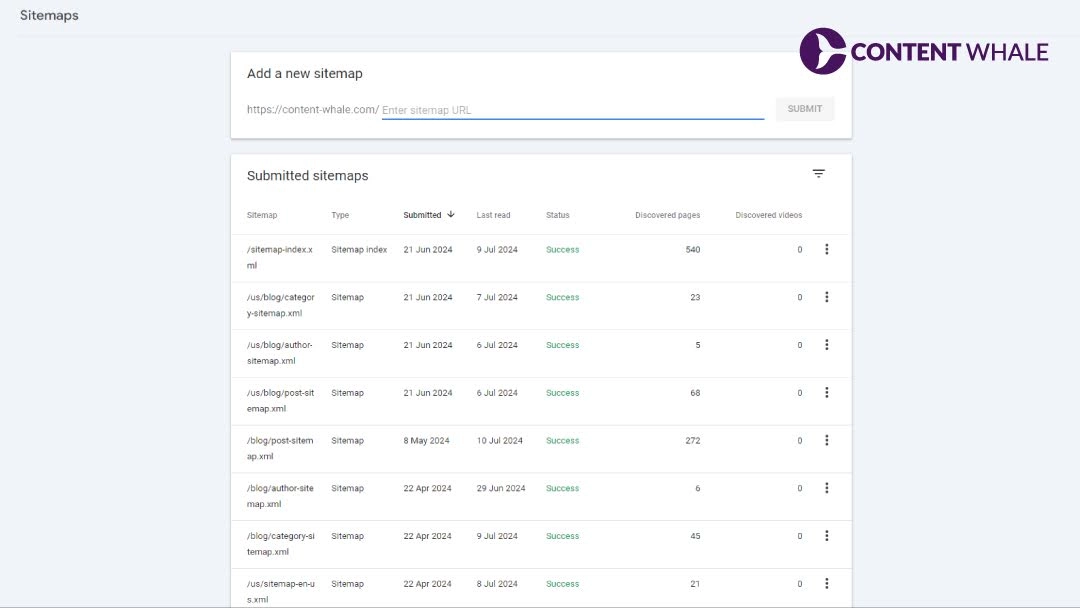 However, search engines won’t be able to find your website content if you did not add internal links to your site. This is when you need to submit an XML sitemap to ensure search engines index all the crucial pages on your site. Some search engines have webmaster tools with additional services to manage your sitemap and URLs.
Submitting Your Sitemap to Google Search Console
Once you log in to your account at Google Search Console, you need to perform the following steps:- Click on the dropdown menu at the top-left corner and select “Add Property.”
- Enter your site’s URL and click “Continue.”
- Choose a verification method and follow the instructions to complete verification.
- Navigate to the “Sitemaps” sections in the left-hand menu under the “Index” section.
- Enter the URL of your sitemap in the “Add a new sitemap” field and click “Submit.”
Submitting Your Sitemap to Bing Webmaster Tools
If you want your website pages to feature in the search results on Bing, you need to create an account on Bing Webmaster Tools. Once you log in to the account, you need to follow the steps below:- Click on “Add a Site” and enter your site URL.
- Follow the instructions to verify your ownership.
- Click on “Sitemaps: under the “Configure My Site” section in the left-hand menu.
- Enter the URL of your sitemap and click “Submit.”