
Introduction
Core web vitals are important metrics that determine a website’s user-friendliness. These metrics look at the website’s speed, stability, and interactivity. Core web vitals are essential to determining a website’s health. Let us examine in detail what these metrics actually mean and how you can improve them.
What are Core Web Vitals?
Core web vitals are standardized metrics set by Google that help website developers understand how user-friendly their websites are. These metrics bridge the gap between the definition of a user-friendly website in theory and practice. Although a website may look user-friendly in theory, there may be a few drawbacks in its real-world experience. Core web vitals take into account these drawbacks and rank your websites based on the following criteria.- Page loading performance
- Ease of interaction
- Website stability
Which Metrics Are Included in Core Web Vitals?
The core web vitals set by Google include:Largest Contentful Paint (LCP)
The Largest Contentful Paint (LCP) determines a website's user-friendliness based on the time taken by the largest block of content to load. Site owners need to focus on this metric because a slow load time means poor user experience. Of course, nobody likes to wait. So, website content that loads in a snap automatically offers a better user experience compared to websites that don’t. Along with user experience, fast-loading websites also have a higher ranking in the search results. It has also been found that these websites have a higher conversion rate. But what does website content mean? Website content consists of:- Images
- Background images
- Video-poster images
- Block of content
Cumulative Layout Shift (CLS)
Cumulative Layout Shift, or CLS, determines how easy it is to engage with links and buttons on the website. This core web vital helps drive sales and conversion. This web vital helps developers understand whether a site's links, buttons, and images shift when a user navigates through it. This vital metric gives an overview of how difficult or easy it is for a user to engage with a website. When elements change their position when a user scrolls through the website, it creates confusion. The CLS is measured through:- How the layout shifts
- Impact fraction
- Distance fraction
First Input Delay (FID)
The First Input Delay (FID) determines how long it takes for the elements on a website to respond to a user's request. In short, it determines a website's input latency. Developers use numerous advanced technologies and dynamic content widgets to make their websites more engaging. However, in their attempts to use these modern techniques, they forget that the most important factor for a great user experience is a fast-responding website. Hence, owners must try to strike a balance between the time taken by a website to respond to inputs and the use of modern technology to enhance engagement. FID is most often difficult to control because it is also impacted by external factors such as the capability of the device that is used and the internet speed. However, owners can act on what is in their hands to achieve a good response time of 100 milliseconds.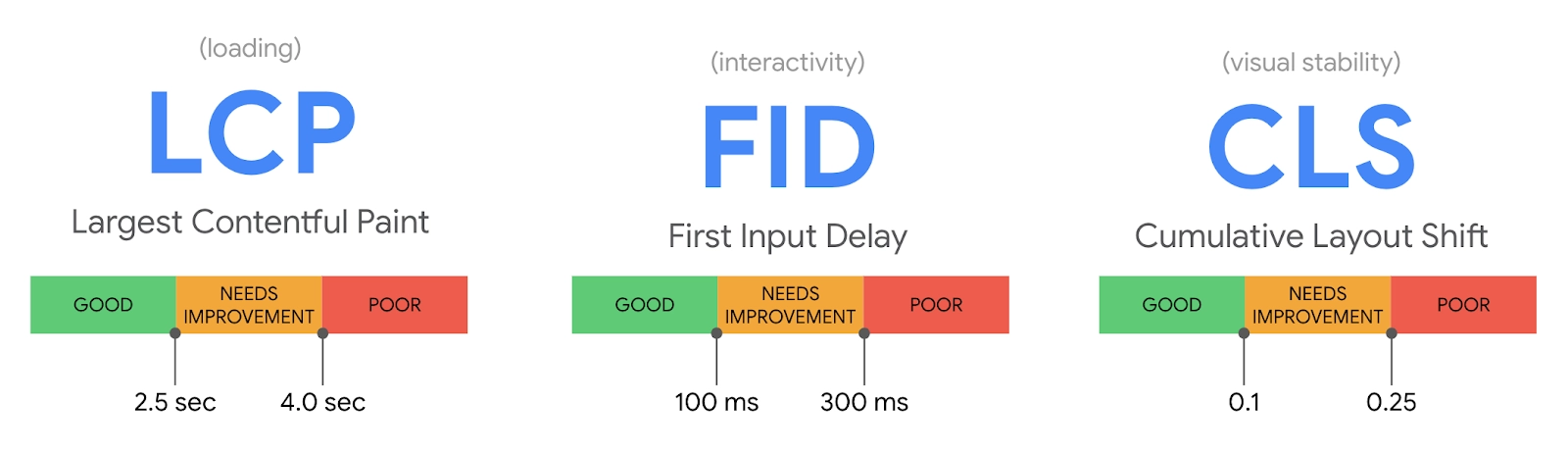
Why Are Core Web Vitals Important?
Core web vitals determine a website's user experience. They take into account how smooth, stable, and fast it is to navigate through a website. Focusing on core web vitals is great not only for users but also for search engine optimization. When your website loads fast and is stable and smooth to navigate, visitors are most likely to stay and engage with it. This enhances your chances of increasing conversions. Moreover, a good user experience also means that your site has a low bounce rate, which enhances its overall ranking on search engine result pages.How To Check Your Website’s Core Web Vitals?
There are a number of ways you can check your website’s core web vitals. Here are some of the most common ones:- Chrome UX report: The Chrome UX report provides developers with data that helps them analyze how users interact with the website. Accessing the CrUX data set is easy. Simply go to the CrUX dashboard. Once you have opened the tool, paste the URL in the search bar and click on “go.” You will find all the information you are looking for.
- Google PageSpeed Insights: It is a free tool that developers can use to view the performance of every page on their website across various devices. It not only checks your website's core web vitals but also suggests ways to improve it. To use this tool, go to PageSpeed Insights, paste the URL, and click on analyze. You will see a detailed report with all the information you need. Moreover, the tool ranks website vitals on a scale of 0 to 100.
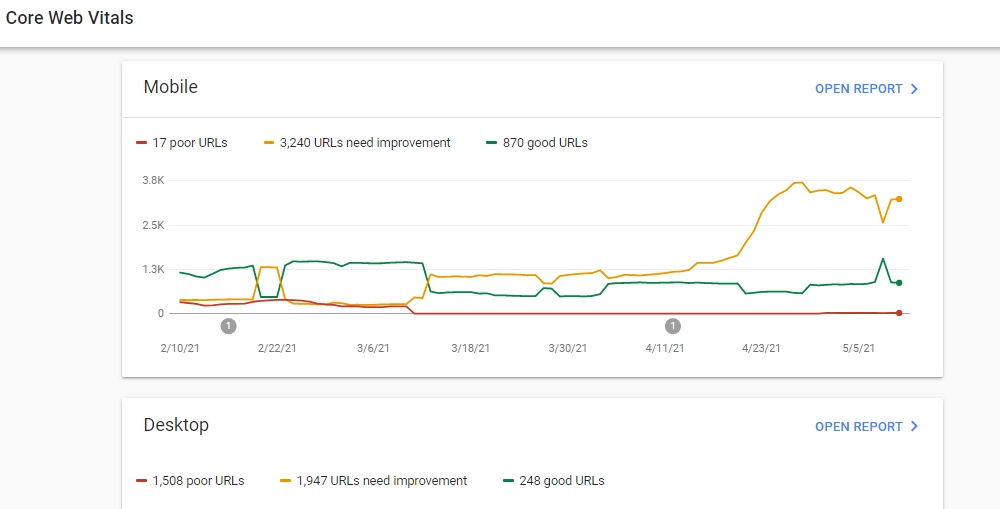
- Google Search Console: The Google Search Console utilizes real-world data to show how well the core web vitals are working. To check the core vitals, log into your Google Search Console and click on open reports. You will see the performance of your website for both desktop and mobile devices. In addition to this, the tool also categorizes the pages on your website into “good,” “needs improvement,” and “poor.” This categorization helps you understand the problems present on the pages and take appropriate action.
How To Improve Core Web Vitals?
Improving Largest Contentful Paint (LCP)
Here is how you can improve the LCP of your website:- Using a content delivery network: CDNs help cache content, which allows the content to reach users around the world quickly.
- Compressing images: Compressing images and optimizing them using a user-friendly format such as WebP, which reduces the size of the image by up to 34%, helps the website load faster.
Improving Cumulative Layout Shift (CLS)
Improve the Cumulative Layout Shift (CLS) of your website in the following ways:- Adjusting the attributes of images and videos: Adjusting the attributes of the images and videos present on a website, such as the height and width, helps improve the CLS. By adjusting these attributes, one ensures that the elements of the website don’t shift too much while scrolling.
- Create a responsive design: You can create a responsive design by using aspect ratio boxes in your CSS code. These containers keep the page's height and width the same across different screens.
- Avoid web fonts: Website developers must avoid using web fonts and focus on fonts that are present in most devices, such as Arial and Verdana.
Improving First Input Delay (FID)
- Avoid using large scripts: One thing that may be hurting the interaction between your website and users is using large scripts and too much JavaScript. JavaScript is great for making your website more dynamic, but using too much will make it slow.
- Breaking long tasks: Breaking long tasks that happen behind the scenes and ensuring these are broken into smaller segments also helps improve FID. By breaking longer tasks into smaller segments, browsers take less time to respond to input.
Other Performance Metrics
While the Largest Contentful Paint (LCP), Cumulative Layout Shift (CLS), and First Input Delay (FID) are the core web vitals, other metrics help determine a website’s performance as well.First Contentful Paint (FCP)
It shows how long it takes for the browser to load DOM elements. An FCP score between 0 and 2 seconds is great; 2–4 seconds means one needs improvement, and 4+ seconds means that the site is very slow and needs a lot of changes.Speed Index (SI)
The speed index is the average time taken to display the content of a website to the users. An SI score between 0–4.3 seconds is great for a website, 4.4–5.8 seconds is normal, and 7.3+ seconds is very bad.Total Blocking Time (TBT)
This assesses the time taken for the site to respond to a user input. 0–300 ms is an ideal TBT, 300–600 ms is moderate, and 600+ ms is a bad TBT.Time to Interactive (TTI)
This measures the amount of time taken for the elements on a website to become fully interactive. A TTI score between 0–3.8 seconds is great for your site, 4.4–5.8 seconds is moderate, and 5.8+ seconds is a huge red flag.Page Performance Score
This single metric takes into account all the core web vitals of your website. It gives you an aggregate score for both mobile and desktop devices. A score above 90 for each category is considered to be good; between 50–90 means it needs improvement, and a score below 50 means it is very poor.